Recommended · V7.0 PRO

Selecto AI Gallery™ V7.0 PRO

Multi-day weddings. Smart folders. Relationship tags. Album review. Digital approval.

Built for busy wedding studios that need a professional offline client workflow — from selection to album markup to final approval — without WhatsApp chaos.

V7.0 PRO — See the Real Client Experience

Each screen is from the live Selecto AI Gallery™ V7.0 PRO. First: Gallery Download → then work. After that it runs offline — Airplane Mode, No SIM, No Network — and clients can still select thousands of photos.

Gallery Download → After that, WorkOne download · then fully offline
7.0 Pro
✈ Airplane SIM ✕ No Network
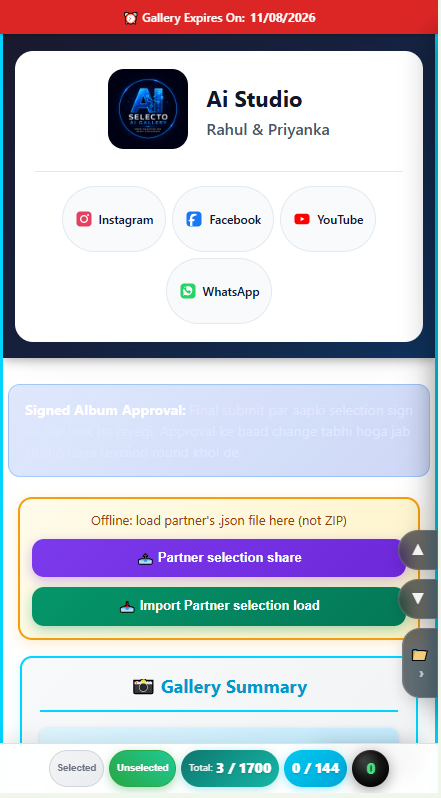
V7.0 PRO studio branding, social links, album approval and partner selection share

Studio Branding · Expiry · Partner Selection Share

Studio benefit

Show your logo, studio name, client name, and Instagram / Facebook / YouTube / WhatsApp on every gallery. Control expiry and import partner selection JSON offline.

Client benefit

Families see a professional branded gallery, know when it expires, and can contact the studio in one tap.
Gallery Download → After that, WorkOne download · then fully offline
7.0 Pro
✈ Airplane SIM ✕ No Network
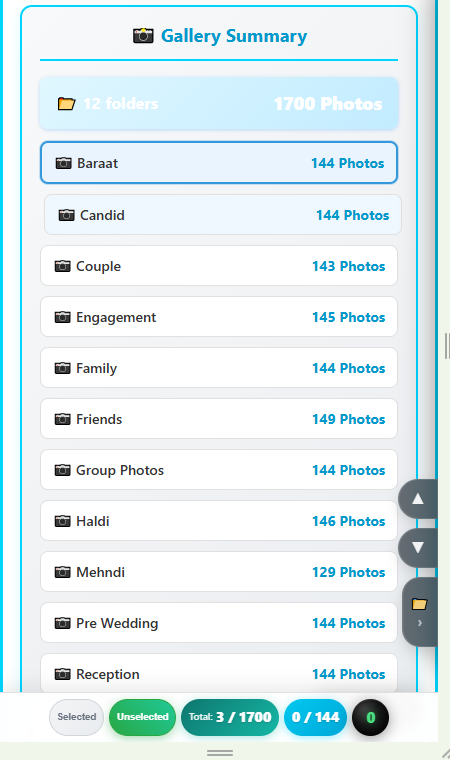
V7.0 PRO gallery summary with 12 event folders and 1700 photos

Multi-Folder Gallery Summary

Studio benefit

Deliver 12+ event folders (Baraat, Haldi, Reception…) with clear photo counts — organized multi-day workflow instead of one mixed dump.

Client benefit

Open the right event instantly and see total folders / photos at a glance — less scrolling, less confusion.

Gallery Download → After that, WorkOne download · then fully offline
7.0 Pro
✈ Airplane SIM ✕ No Network
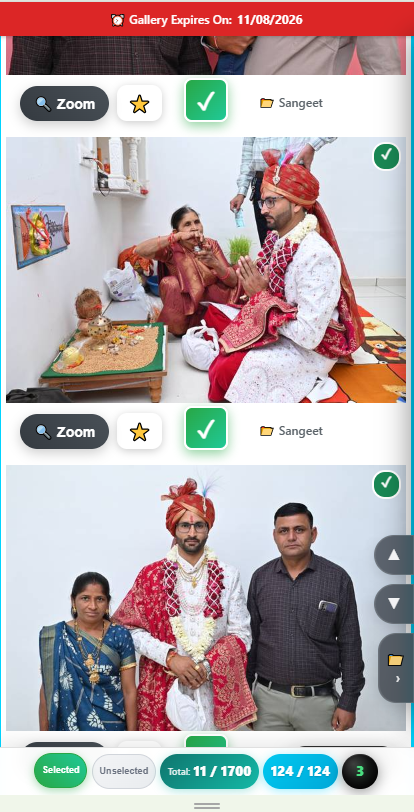
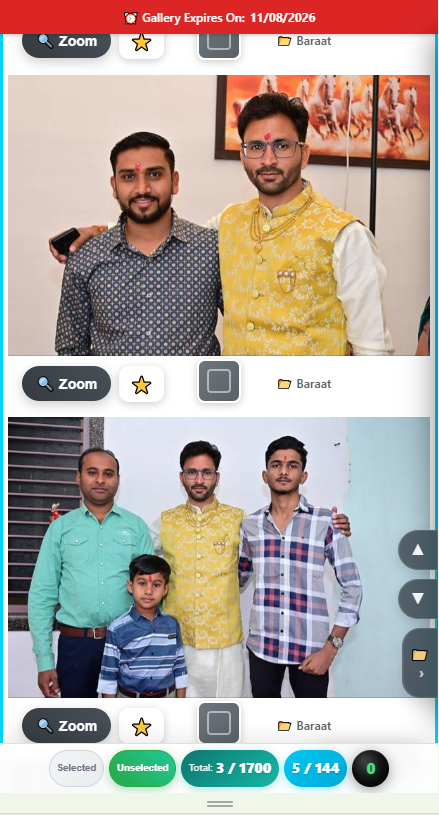
V7.0 PRO photo selection with zoom, favourite star and folder label

Fast Photo Selection · Zoom · Favourites

Studio benefit

Clients return a clean shortlist with live counters — fewer WhatsApp screenshots and less manual sorting for album work.

Client benefit

Zoom, star favourites, and select photos folder-wise with Selected / Unselected filters and live totals.

Gallery Download → After that, WorkOne download · then fully offline
7.0 Pro
✈ Airplane SIM ✕ No Network
V7.0 PRO live selection counters — Selected, Unselected, Total and current folder round count

Live Selection Counters · Selected / Unselected

Studio benefit

See exact progress anytime: grand total across all folders (e.g. 11 / 1700) plus the active folder count in the bottom-right round badge — clearer client status without calling again and again.

Client benefit

Tap Selected or Unselected to filter instantly. The round live count shows how many photos are selected in the current folder, while Total shows all folders combined.

Gallery Download → After that, WorkOne download · then fully offline
7.0 Pro
✈ Airplane SIM ✕ No Network
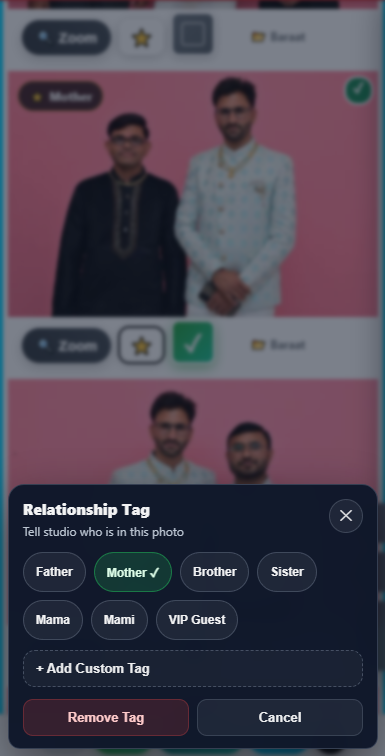
V7.0 PRO relationship tag modal — Father, Mother, Brother, Sister, Mama, Mami, VIP Guest and custom tags

Relationship Tag System

Studio benefit

Clients tag Father, Mother, Mama, VIP Guest (or custom tags) on photos — album layout, print lists, and designer handoff become faster and clearer.

Client benefit

Tell the studio who is in each photo in one tap. Family members are easy to find later — no long WhatsApp explanations.

Gallery Download → After that, WorkOne download · then fully offline
7.0 Pro
✈ Airplane SIM ✕ No Network
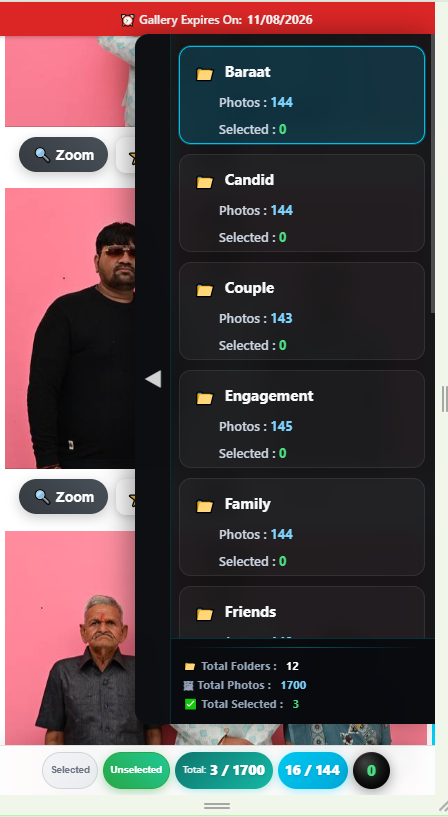
V7.0 PRO smart folder navigator with photo and selected counters

Smart Folder Navigator

Studio benefit

Folder-wise photo + selected counters and a summary dashboard (folders / photos / selected) speed up QC and follow-ups.

Client benefit

One-tap jump between events with floating up / down / folder controls — review stays fast on mobile.

Gallery Download → After that, WorkOne download · then fully offline
7.0 Pro
✈ Airplane SIM ✕ No Network
V7.0 PRO album approval terms and conditions step

Digital Album Approval — Terms Step

Studio benefit

Clear terms before sign-off reduce revision disputes and set paid revision / color / crop expectations in writing.

Client benefit

Transparent Review → Terms → Sign → Submit flow so families know exactly what they are approving.

Gallery Download → After that, WorkOne download · then fully offline
7.0 Pro
✈ Airplane SIM ✕ No Network
V7.0 PRO digital signature pad for final album selection approval

Digital Signature Confirmation

Studio benefit

Get a formal digital sign-off before design starts — stronger proof than verbal “yes” on phone calls.

Client benefit

Sign with finger on mobile or mouse on computer — confirm final selection from home, no studio visit needed.

Gallery Download → After that, WorkOne download · then fully offline
7.0 Pro
✈ Airplane SIM ✕ No Network
V7.0 PRO client album approval certificate with QR verify

Client Album Approval Certificate (PDF)

Studio benefit

Auto-generated certificate with folder-wise selected totals, approval IDs, and QR verify — clean record for production and reprints.

Client benefit

Official digitally signed approval certificate — clear proof of what was approved, when, and by whom.

Album Testing — Mark. Repair. Approve.

After photo selection, your designer builds album pages as JPG. V7.0 PRO turns them into a live Album Testing gallery — clients mark changes on phone or laptop, then your designer sees every instruction clearly. Below is a clear concept preview of the full album workflow (no client photos).

Wedding done → photos selected → album pages designed → client opens Album Testing → marks Circle, Arrow, Text on each page → locks & signs → ZIP goes to designer → designer views only → marks Repair or OK → done without endless WhatsApp confusion.

1 Design album pages 2 Client opens gallery 3 Mark with tools 4 Lock & sign 5 Designer Repair / OK
Gallery Download → After that, WorkOne download · then fully offline

Edit Window — Mark Exactly What to Change

Studio benefit

Stop guessing from vague WhatsApp voice notes. Every mark sits on the album page — circle the photo, draw an arrow, type the instruction. Your designer gets precise, page-wise feedback.

Client benefit

Open Edit on any page. Use Circle, Arrow, and Text tools. Undo mistakes, delete marks, or remove a photo from the layout — clear control without calling the studio.

Circle Arrow Text Undo Delete Remove photo
Gallery Download → After that, WorkOne download · then fully offline

Page-by-Page Review — Then Lock & Submit

Studio benefit

Clients review every album spread in one gallery. When they finish marking, they lock pages and submit — you receive one clean ZIP package ready for the designer, not scattered chat screenshots.

Client benefit

See all pages at a glance. Tap Edit on any page that needs change. When satisfied, lock and submit with digital signature — your album feedback is complete and official.

Gallery Download → After that, WorkOne download · then fully offline

Designer View — Repair or OK

Studio benefit

Designer opens the ZIP in view-only mode. Pages that need work show a red border (Repair). Clean pages show green (OK). Zero confusion — start fixing only what the client marked.

Client benefit

Your marks travel with the album. The studio cannot miss a change request — every circle, arrow, and note is visible on the exact page you marked.

Repair — red border OK — green border
See Plans & Pricing Activate PRO Founder on WhatsApp

BASIC vs PRO — Quick Comparison

Growing studio / single-folder workflow → BASIC.
Busy multi-day weddings + album designer workflow → PRO.

Feature BASIC PRO
Unlimited gallery & photosYesYes
Offline HTML galleryYesYes
Gallery expiry · studio brandingYesYes
Single-folder workflowYesYes
Multi-folder workflowYes
Smart folder navigatorYes
Relationship & custom tagsYes
Album review & markupYes
Digital approval · PDF · signatureYes
Studio social linksYes
ZIP export / importYes
Gallery verificationYes

Patent Pending · Indian Patent Application No. 202521102243
Annual licensing confirmed via verified WhatsApp activation.